I’ve had a customer that asked for "24 hour retention policies” for Microsoft Teams chat messages. In other words, they wanted chat messages deleted after only 24 hours.
I will say that initially there were some challenges with fulfilling this requirement: We didn’t actually support “24 hour retention policies” initially back in 2020 – I think the minimum was a few days or something like that, but if I remember correctly, there was an “design change request” escalation done by a few customers through Microsoft Unified Support (which is really the only way to formally request changes from product engineering) and “24 hour retention policies” were eventually developed by the Teams product group & made available due to a couple other customers also asking for it. It was later expanded to all customers & documented.
VISIBLE “DELETED” MESSAGES IS A KNOWN THING
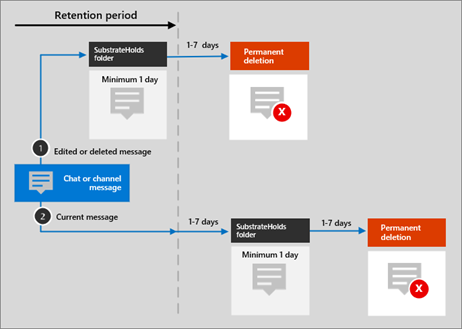 Don’t get it twisted however: Some messages can and do remain visible past the 24 hour retention period. This is documented here but if you look at the image I’ve pasted on the right, you can see that messages – even if they are manually deleted from Teams – aren’t actually immediately deleted but rather they are moved to something called the “SubstrateHolds” folder for a minimum of 1 day PLUS up to another 7 days and which point it gets marked for deletion for, again, a minimum of ANOTHER 1 day PLUS up to another 7 days or so to actually delete the object. This sounds convoluted but there’s very good reasons for this.
SUBSTRATE EVALUATION FOR HOLDS
So what’s this SubstrateHolds folder? It’s a holding area where messages are stored and evaluated for other tenant policies that may supersede the organizational Retention Policy – for example, Litigation Hold. Litigation Hold is a very intensive process that by definition supersedes retention policy deletion & requires evaluating objects 24/7 all throughout a Microsoft 365 tenant which may contain PETABYTES of data. (In cases where customers have 10,000 mailboxes for instance, it easily does, having 100GB per user in email alone across 14,000 users – never mind OneDrive, SharePoint & Teams objects)
This volume of data can take days, even a week to scout for operations like “holds” or worse, “full tenant eDiscovery” so objects are put up for permanent deletion until all processes/policies have had a chance to evaluate the object.
DELETION IS HARD WORK!
Additionally, the deletion process (which runs in Azure) takes a bit because, well, it’s deleting a lot of objects. Per the documentation:
When the retention period expires and moves a message to the SubstrateHolds folder, a delete operation is communicated to the backend Azure chat service, that then relays the same operation to the Teams client app. Delays in this communication or caching can explain why, for a short period of time, users continue to see these messages in their Teams app.
BTW: You can read a specific example of how 1 day retention policies work here:
- https://learn.microsoft.com/en-us/purview/retention-policies-teams#example-3-delete-only-after-1-day
There’s other things that may prevent a message from immediately deleted and as a result – if I remember correctly – our statement around “24 hour retention policies” was that it was not guaranteed to be deleted in 24 hours but rather a “best effort”. This was accepted by the customers that “24 hour retention policies” were being built for because the alternatives weren’t attractive – including drastically raising the price of your Microsoft 365 tenant so we can increase the computing power for object search evaluation, transfer & deletion.
 kurtsh
 Kurt Shintaku's Blog