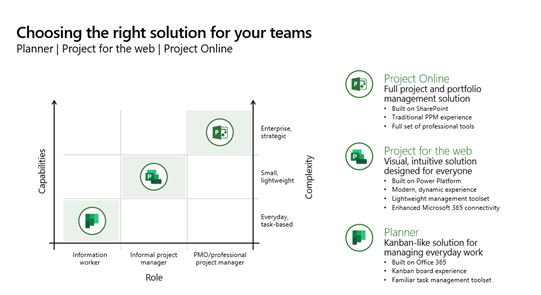
 The following solutions are a scalable part of the Project family, depending on expertise & intensity of an individual’s project management role. All integrate with Azure AD identity, Outlook & Teams, and provide a path for Project Management growth for the end user.
The following presentation reviews both Planner & Project for the Web & the use cases:
Here’s a summary of some resources for Planner & Project for the Web:
- Microsoft Planner
Natively integrated into Microsoft 365, Microsoft Planner costs nothing additional to use by M365 G3+ customers. It’s designed for casual task & timeline management but is the future of Microsoft Project Management solutions. It’s being connected into “Project for the Web” & expanded to take advantage of all the power of Project.- Roadmap: The new Microsoft Planner: A unified experience bringing together to-dos, tasks, plans and projects
https://techcommunity.microsoft.com/t5/planner-blog/the-new-microsoft-planner-a-unified-experience-bringing-together/ba-p/3977998 - Learning: Video training for Microsoft Planner
https://support.microsoft.com/en-us/office/microsoft-planner-video-training-4d71390f-08d8-4db0-84ea-92fb078687c7 - Help: Online help & assistance for Microsoft Planner (Integration with Teams, Android/iOS, Outlook, Accessibility, etc.)
https://support.microsoft.com/en-us/planner - IT Admins: Administrative information for IT
https://learn.microsoft.com/en-us/office365/planner/planner-for-admins
- Roadmap: The new Microsoft Planner: A unified experience bringing together to-dos, tasks, plans and projects
- Microsoft Project for the Web
“Project for the Web” is Microsoft’s web-based project management solution for Enterprises. It’s targeted at informal project manager & designed for simplicity & has an intuitive interface – while still embracing Enterprise collaboration & integration requirements like usage with Microsoft Teams, Outlook, SharePoint, etc. It is licensed through Project Plan 1+ & retails for $10/user/mo. It will be integrated into Microsoft Planner in Spring 2024. - Overview: A simple, end user explanation of Project for the Web is available here: What is Project for the web? – Microsoft Support
- Video overview: https://aka.ms/ProjectforthewebandProjectOnline
- Learning:
- Unified Support workshop – See attached datasheet
- Project for the Web – Youtube Videos
- Introducing Microsoft Project for the web
- Getting started with Project for the web
- Agile, Goals, Workloads, and more in Project for the web
- Leverage Microsoft Project for the web with the Project Accelerator
- Project for the web for work management
- Advanced deployment for Project for the web
- Extensibility in Project for the web – YouTube
- Help:
- Admin help – https://learn.microsoft.com/en-us/project-for-the-web/projectforweb-admin-hom
- End user help – https://support.office.com/project
- IT Admins:
Project for the Web – Getting Started & Deployment
https://learn.microsoft.com/en-us/project-for-the-web/project-for-the-web-get-started-guide-for-admins - Microsoft Project
Microsoft Project is usually considered the “easy” project management solution for full-featured, Enterprise class customers – but has the benefit of integrating with purpose-designed Project Management solutions like the Project Online service, Primavera, etc. as well as Portfolio Management & Power BI visualization & reporting.- Product: Project management built to keep track of all your work (microsoft.com)
- Synopsis: Overview of Microsoft Project – YouTube
- Video: Microsoft Project Management video series – Microsoft Project
 kurtsh
 Kurt Shintaku's Blog