 Have you purchased a new Surface device recently?
Remember that you have only 45 days after your purchase to obtain a “Microsoft Complete” extended warranty on it. White your new Surface comes with a “1 year limited warranty”, the Microsoft Complete Protection Plan is the Premium warranty that ensures your device is protected from the following incidents that are NOT COVERED by the standard limited warranty:
- Cracked screen
- Physical damage
- Damage from liquids
As they say, “With Microsoft Complete, if something goes wrong, you’re covered—simple as that.”
KEY DETAILS
A few things purchasers should know about Microsoft Complete:
- You’re limited to 2 incidents on your device for the duration of your warranty – I think unless you purchase a 4 year Protection Plan, in which case you may be entitled to 3 incidents. (I only know because that’s what I purchased on my new Surface Laptop Studio 2)
- Each incident you file may incur a $49 deductible charge. In my experience, this is either to replace a major component (display) or a wholesale replacement of the entire device.
- Details about the Microsoft Complete Protection Plan terms & conditions are available here.
HOW MUCH IS “MICROSOFT COMPLETE”?
The cost depends on the device type & the length of the Protection Plan you select.
As of 10/15/23, these are the rates for various different Surface devices:
- Surface Book/Surface Laptop Studio:
- 2 years: $249
- 3 years: $319
- 4 years: $399
- Surface Go
- 2 years: $99
- 3 years: $139
- 4 years: $189
- Surface Studio
- 2 years: $399
- 3 years: $499
- 4 years: $599
- Surface Pro
- 2 years: $149
- 3 years: $219
- 4 years: $299
- Surface Laptop
- 2 years: $149
- 3 years: $219
- 4 years; $299
- Surface Type Cover
- 2 years: $19
HOW DO I GET A MICROSOFT COMPLETE PROTECTION PLAN?
Again, for those in the back row: You MUST get Microsoft Complete with 45-days of your purchase. The folks at the Microsoft Store will not allow you to get a warranty after that.
The web page says that you have to “schedule an appointment” – this isn’t necessary. Simply follow the instructions below to get this taken care of in 5-10min.
- LOG IN TO MICROSOFT ACCOUNT
Sign into https://account.microsoft.com. - GO TO “DEVICES” PAGE
Click on the “Devices” pane & click “View All Devices” or
go to https://account.microsoft.com/devices - If you have setup & logged into your device already with your Microsoft Account, your device should already be displayed in the list of devices associated with your account.
- Otherwise, you’ll need to register it manually.
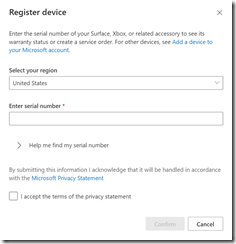
- Click the “Register Device” button.

- Enter the serial number of your device. Remember to do this only when you’re ready to hook up your device & want to start your Microsoft Complete. (Note: Once submitted, this may take as much as 5 minutes to register
- CALL MICROSOFT STORE SALES
In the US, call (877)696-7786 and state that you’d like to purchase “Microsoft Complete for your Surface”. They will ask for your:- Microsoft account identity (name@outlook.com, for example)
- The Serial Number of the newly registered Surface
- VERIFY REGISTRATION OF YOUR NEW “MICROSOFT COMPLETE FOR SURFACE” WARRANTY
You should receive a 12-digit “Complete Service Request Number” from the sales agent.
Go back to the Registered Devices page for your Microsoft Account and you should see an “In warranty” date that is roughly 2-4 years from your date of registration depending on the length of the plan purchased.


 kurtsh
 Kurt Shintaku's Blog