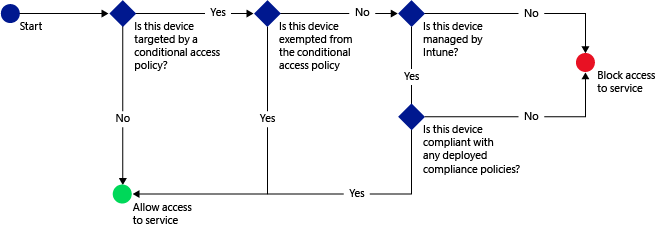
There’s a way you can protect Office 365 services like Outlook Anywhere from individuals attempting to connect with an unmanaged device. It’s called Conditional Access & it’s a function of Intune, Office 365, and Azure AD.
By using Conditional access in Microsoft Intune to secure email and other services depending on conditions you specify, you can detect unmanaged devices & optionally remediate them.
You can restrict access to:
- Microsoft Exchange On-premises
- Microsoft Exchange Online
- Microsoft Office 365 Dedicated
- SharePoint Online
When devices do not meet the conditions, the user is guided though the process of enrolling the device and fixing the issue that is preventing the device from being compliant.
To implement conditional access, you configure two policy types in Intune:
- Compliance policies are optionally deployed to users and devices to define the rules and settings that the device must comply with in order to be allowed access to services. These rules include passcode, encryption, whether the device is jailbroken or rooted, and whether email on the device is managed by a Intune policy. If a compliance policy is not deployed, then the conditional access policy will treat the device as compliant.
- Conditional access policies are configured for a particular service, and define rules such as which Azure Active Directory security groups or Intune groups will be targeted and how devices that cannot enroll with Intune will be managed.
…
For more information on how to configure this:
- Control access to Exchange and Office 365 with conditional access in Microsoft Intune
https://technet.microsoft.com/en-us/library/dn818907.aspx
 kurtsh
 Kurt Shintaku's Blog