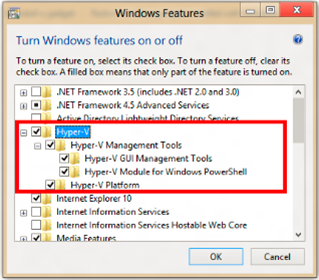
Client Hyper-V® is the virtualization technology built into Windows® 8. Client Hyper-V is the same virtualization technology previously available only in Windows Server®. A similar functionality in Windows 7 is called Windows XP Mode.
Client Hyper-V enables you to run more than one 32-bit or 64-bit x86 operating system at the same time on the same host computer. But instead of working directly with the computer’s hardware, the operating systems run inside a virtual machine (VM).
Hyper-V enables developers and IT professionals to easily maintain multiple test environments and provides a simple mechanism to quickly switch between these environments.
- GUIDE: Using Windows 8 Hyper V
http://download.microsoft.com/download/4/1/E/41EC7A14-6096-4795-B780-2A892A5B0C00/3082_Hyper-V_WSG.docx
 kurtsh
 Kurt Shintaku's Blog