At some juncture, if you’re like me, you’ve been adding Windows 7 PCs, Windows Phone 7 devices, Windows 8 PCs, & newly purchased Surfaces to your Kindle account.
This can only go on so long. At some juncture, Kindle will not let you load your eBooks up on to a newly added Kindle player since you’ve exceeded the maximum number of players that Amazon allows.
WHAT TO DO?
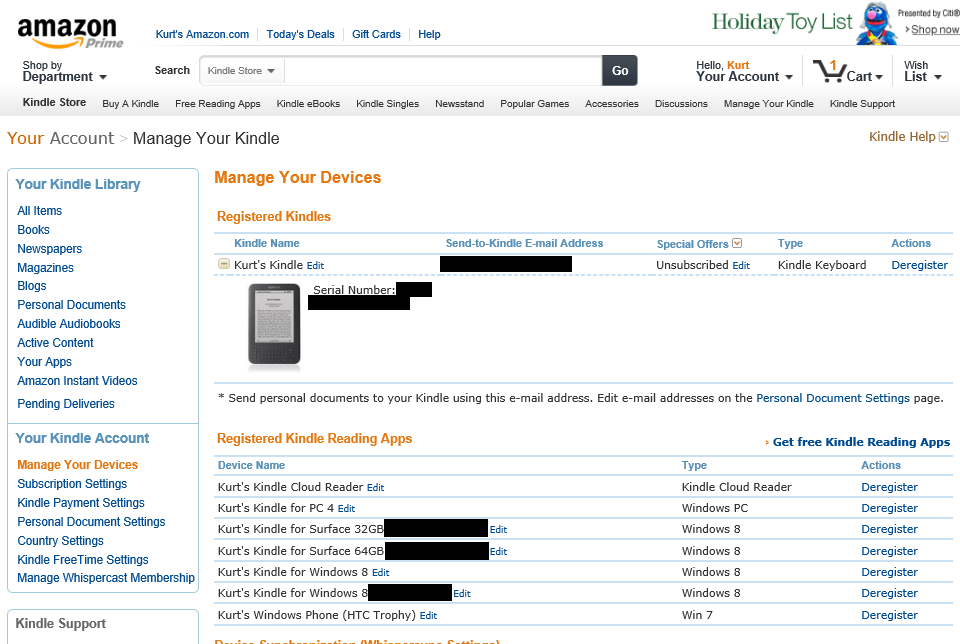
You need to remove older, unused Kindle readers/players/devices from your account. The way you do this is
- Go to the following site:
https://www.amazon.com/gp/digital/fiona/manage?ie=UTF8&ref_=ya_14&#manageDevices - Click ‘Deregister’ next to each device you no longer use.
You can verify the ‘Device Name’ of each device by going to each device you own and looking into the Options of each player.
 kurtsh
 Kurt Shintaku's Blog