OMG. Panos Panay, father of Microsoft Surface, did a REDDIT AMA.
http://www.reddit.com/r/IAmA/comments/11kyja/
iam_panos_panay_gm_of_microsoft_surface_amaa_ask/
There is so much in there that I’m going to try to cull it down:
- STORAGE:
After all is said and done, there is 20GB of free space left on the 32GB model of Surface - NFC:
Not included due to the bar they set for quality antenna design & complications involving case enclosure, the VaporMg enclosure, etc. - DISPLAY RESOLUTION:
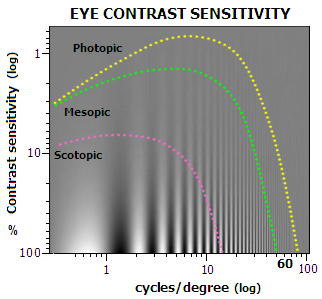
Hey this is Stevie. Screen resolution is one component of perceived detail. The true measure of resolvability of a screen called Modulation Transfer Function (MTF), not Pixels. MTF is a combination of both contrast and resolution. There are over a dozen subsystems that effect this MTF number.. Most folks just focus on one number out of dozens that effect perceived detail. Without good contrast resolution decreases. Check out contrast sensitivity of the human eye graph (http://www.telescope-optics.net/images/eye_contrast.PNG) and if you want more see the links below. Basically, as resolution/DPI increases the eye has becomes less sensitive. So as a result, the amount of light in a room and the reflections off the screen have a huge effect on the contrast of the display. In fact, a small amount of reflection can greatly reduce contrast and thus the perceived resolution of the display. With the ClearType Display technology we took a 3 pronged approach to maximize that perceived resolution and optimize for battery life, weight, and thickness. First prong, Microsoft has the best pixel rendering technology in the industry (cleartype 1.0 and 2.0) .. these are exclusive and unique to Windows, it smooths text regardless of pixel count. Second, we designed a custom 10.6” high-contrast wide-angle screen LCD screen. Lastly we optically bonded the screen with the thinnest optical stack anywhere on the market.. something which is more commonly done on phones we are doing on Surface. While this is not official, our current Cleartype measurements on the amount of light reflected off the screen is around 5.5%-6.2%, the new IPad has a measurement of 9.9% mirror reflections (see the displaymate link: http://www.displaymate.com/iPad_ShootOut_1.htm). Doing a side by side with the new iPad in a consistently lit room, we have had many people see more detail on Surface RT than on the Ipad with more resolution.
Some more links to share if you want to know more… (http://www.normankoren.com/Tutorials/MTF.html)… Also This is a great book to read if you really want to get into it: http://www.amazon.com/Contrast-Sensitivity-Effects-Quality-Monograph/dp/0819434965 or more here http://alexandria.tue.nl/extra2/9901043.pdf - COVER DISABLING:
Both TouchCover and TypeCover have sensors that understand orientation relative to Surface… in fact the Type and Touch Covers talk to Surface to figure out their relative position no matter the orientation of gravity of the device (pretty neat!). There are 3 positions modes: Closed (keys and mouse are off), Open to 180 degrees (keyboard and mousepad on), beyond 180 degrees to the back (keys and mouse off). That way you can flip back the covers and feel secure you are not pressing keys by mistake. - XBOX 360 CONTROLLERS:
They work when connected via USB to Surface. - TYPE or TOUCH COVER:
It depends on how you type. I have been using both for a while, and love them both. I love the sleekness of Touch Cover. Touch Cover has a very special digitizer that we invented.. it senses the impact force of your key presses. We designed super-fast electronics and smart algorithm in the keyboard so that Touch Cover can profile your key press down to a 1ms (1000 times a second). Using that information Touch Cover can infer if the user meant to press the key or not.. It is a smart key. So even though there is no key travel, the user can rest their hands on top of the keyboard and find home position without accidentally triggering keys.. pretty cool! The first time I typed on a full working version of Touch Cover, I typed just as fast as I do on a normal keyboard. I am confident you will be able to type significantly faster on Touch Cover than an onscreen keyboard. And with a little practice you will even do better (maybe even faster!) For folks who really love and really need keys that have travel, then Type Cover is one of the best keyboards I have ever used (desktop or other). It has a super awesome snappy key mechanism that feels great (has a strong hysteresis curve). Honestly both are great… try them both, actually get them both. - 3G/4G – WHY NOT?:
We made what we feel is World Class WiFi connectivity. For 3G/4G we looked at several elements when deciding on what features to include. We knew that the primary use was going to be in the home, we looked at tablet sales data 2/3 WiFi, 1/3 Mobile Broadband. Of the 1/3 sold, 1/2 were activated. Phone hotspot / tethering use was also a consideration. - NON-ENGLISH KEYBOARDS:
Of the primary launch Markets we are launching in, we have keyboards specific to those languages. We are not announcing any new markets beyond what we said today. However, we will for sure be expanding to more markets in the future. - microSDXC:
Yes, Surface for Windows RT will support microSDXC, contrary to prior announcements which stated microSD only. It is behind the kickstand, and hidden. - USB DEVICE SUPPORT:
Numerous reports of 100’s of millions existing USB devices supported. Printers, Keyboards, Cameras. And phones can be charged on the USB port. - GPS:
There is no GPS in Surface for Windows RT. We use WiFi Location based services. - BLUETOOTH:
Surface supports Bluetooth 4.0 and will work with Bluetooth headsets. We have built-in dual digital mics, stereo speakers in the device and front/rear facing HD cameras. You can also plug-in USB conferencing peripherals. Surface RT can certainly be used for video and audio calls with wife/family.
 kurtsh
 Kurt Shintaku's Blog