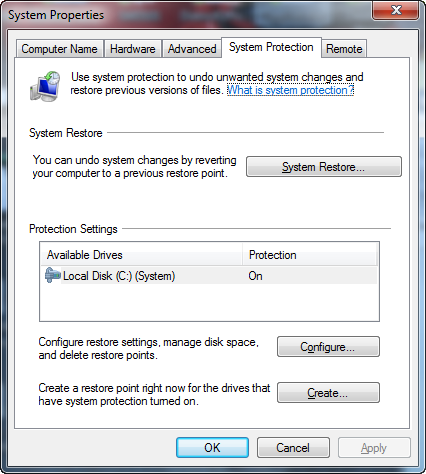
 Everyone has been in a situation where they’re about to make a major change to their system like a driver upgrade or a software install. The safeguard has always been to make sure you have a System Restore Point to come back to in the even things go bad.
Navigating through Control Panel just to create a System Restore point is laborious.
- START—>CONTROL PANEL
- SYSTEM
- Click SYSTEM PROTECTION TAB
- Click CREATE button
There’s two ways to make a shortcut on your desktop that will shorten the path to accomplishing the same thing:
SHORTCUT TO THE SYSTEM PROTECTION TAB:
Create a shortcut that points to the following:
%SystemRoot%\System32\SystemPropertiesProtection.exe
(Note that this still requires that you click the “CREATE” button.)
SCRIPT THAT AUTOMATES EVERYTHING:
Create a text file called “Script System Restore Point.vbs” that has the following content in it:
‘——————————————————
‘Create an instant System Restore Point under Windows 7
‘——————————————————
If WScript.Arguments.Count = 0 Then
Set oShell = CreateObject("Shell.Application")
oShell.ShellExecute "wscript.exe", """" _
& WScript.ScriptFullName & """ Run", , "runas", 1
Else
Set oWshShell = WScript.CreateObject("WScript.Shell")
oWshShell.Popup "Creating a SystemRestore point. Please wait.", _
2, "System Restore", 0
swinmgmts = "winmgmts:\\.\root\default:Systemrestore"
GetObject(swinmgmts).CreateRestorePoint _
"Manual Restore Point", 0, 100
MsgBox "System Restore Point created", 0, "System Restore"
End If
This will automate the process end to end, requiring only a single click to create a System Restore Point.
 kurtsh
 Kurt Shintaku's Blog