 Funny, how I missed this.
This is a head-to-head comparison of just what people used to Office on the desktop should expect when they try to move to Google Documents. They load a document with some very basic formatting in it.
No – I’m serious. The formatting is ludicrously basic; the same stuff that virtually EVERY SINGLE BUSINESS USES for their documentation in Word or any other Office application:
- Office fonts
- Headers/Footers
- Watermarks
- SmartArt
- Embedded charts/graphs
- Table formatting
People expect existing Word documents from their desktop to look identical when they share them in the cloud. In this demo, you will see completely different results when viewing the same document using Word Web App and using Google Documents.
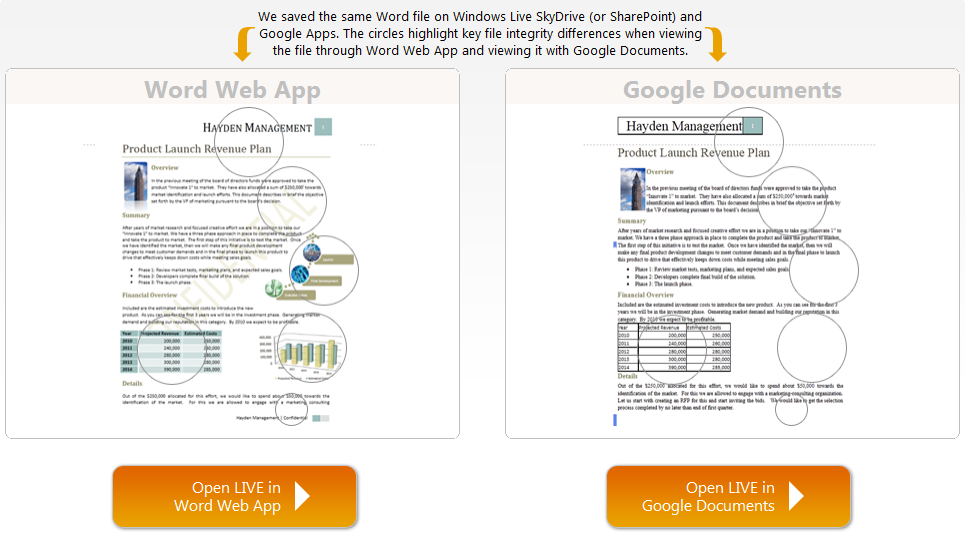
- COMPARISON: Word Web App vs. Google Documents
http://sharepoint.microsoft.com/businessproductivity/en-us/Why-Microsoft/compare-demo/Pages/google-documents-vs-word-web-app.aspx
 kurtsh
 Kurt Shintaku's Blog