This guy Jeff Loucks wrote a blog post that I really think deserves some recognition… because, cripes, if I couldn’t figure out how to do this. And I work for the damned company. [insert cranial smoke here]
[taken from Jeff’s post]
Have you ever wondered how to change the default address book in Outlook when you are using Exchange. If you have ever sent an email and tried to find your contacts using the To: button you know that by default the Exchange Global Address Book is the first source of contacts. What a pain.I always find it difficult to locate where to change the default so I thought I would post it in case you are looking. I know I will come back to this post because even after having found it, I still can’t remember how to do it. It is just one of those things that has never been intuitive.
Additionally:
- Have you ever found that Outlook 2010’s “Suggested Contacts” got referenced before your actual Contacts list? “Suggested Contacts” as you likely know, often has basically empty contact entries in it.
- Have you ever discovered that your “Contacts” list was for some reason not being referenced when resolving names?
SOLUTION:
The secret lies in this dialog box:
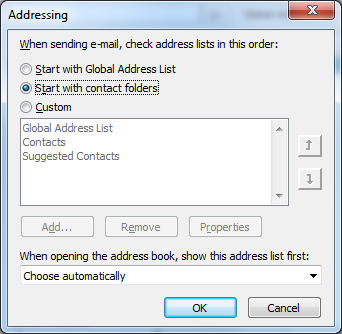
The question is: How the heck do you get there?
Check out Jeff’s post for the answer to that question:
- Outlook 2010: How to change your default Contacts Address Book
http://msmvps.com/blogs/jeffloucks/archive/2009/12/21/outlook-2010-how-to-change-your-default-contacts-address-book.aspx
 kurtsh

