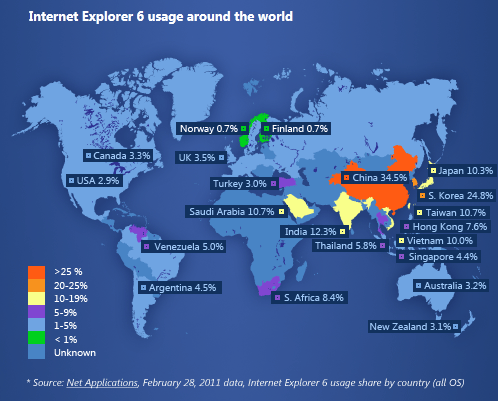
 We have an awesome web site that y’all need to check out:
- LINK: The Internet Explorer 6 Countdown
http://www.ie6countdown.com/
Here’s the thing: Consumers will eventually upgrade… hopefully to IE9. But Corporate IT: This needs to happen sooner rather than later, and I still have customers with pockets of their end user population using IE6.x instead of IE7 or IE8.
The majority have plans already in place, thank goodness, but there are some that still have the following excuses for not upgrading:
- In-house Application Compatibility
”We have applications developed internally that won’t work with IE7/8/9 and we haven’t retrofit them.” - 3rd Party Web App Incompatibility
”Our business depends on a 3rd party application that uses IE6 and won’t work on anything else so we’re beholden to them.” - IT Priorities/Deployment Issues
”Our company doesn’t have this as a priority.”
WHY YOU SHOULD GET OFF OF IE6.X:
Here’s a short list of reasons IE6 needs to be upgraded in your company:
- Support. Once support on IE6 expires, there’s no more security patches & the risk of malware will reside entirely on IT. No more calling into support.
- Compatibility. Ironically, IE6 is completely incompatible with new web standards. Advanced AJAX used in most of today’s web applications will not function under IE6. Examples? Sharepoint Web Apps. Office Web Apps. Microsoft Skydrive. YouTube. Google Apps. The future is completely dependent on getting off of IE6.
- Speed. IE6 is upwards of 10x slower than IE9 on traditional applications. Not just Javascript execution but also HTML rendering. Graphics processing. Simple stuff. And this is on the same desktop hardware you’re using today.
- Expectations. End users expect Tabs to be available…crash recovery to be enabled… privacy protection to be operational. None of this is there until you upgrade to IE7/8/9.
- Security. The obvious concern. No browser Microsoft supports today has more malware threats posed against it, more security flaws, & more support issues – and yet, it remains in use.
HOW TO GET OFF IE6.X:
There are many ways to continue to deliver IE6 functionality or compatibility while upgrading the infrastructure to a more modern, secure, and manageable Enterprise class browser… and they don’t require violating Microsoft licensing & terms of usage agreement by attempting to ‘package IE6’ using Application Virtualization. Extracting out an packaging IE6 for the purposes of app compatibility is illegal and may constitute the need for a 2nd Windows Client License.
Now Desktop Virtualization is a different thing. When you use Desktop Virtualization, you are repackaging the entire operating system and with the right licensing, this is possible for providing web app compatibility for desktops without IE6.
 Here is a video explaining the process of using MED-V, or Microsoft Enterprise Desktop Virtualization to provide an IE6 experience to desktops using Windows 7 & Internet Explorer 8. Essentially what is happening is a fully managed VM of Windows XP w/ IE6.02 is placed on every desktop… and when a user clicks on a shortcut for a web-app-that-only-runs-on-IE6, it opens IE6 in the VM and only displays the IE6 window. The rest of the OS desktop is hidden from view, providing the end user with the belief that they are only running that web app and not an entire VM.
- VIDEO: Internet Explorer Virtualization with MED-V
http://technet.microsoft.com/en-us/edge/internet-explorer-virtualization-with-med-v.aspx
 For actual web app remediation by configuring IE8 for IE6 compatibility to enable IE8 to run IE6 web apps in ‘compatibility modes’, here are some videos on migrating off of IE6 to IE8 with compatibility in mind:
- VIDEO: Migrating from IE6 to IE8 Part 1
http://technet.microsoft.com/en-us/edge/thrive-live-migrating-from-ie6-to-ie8-part-1-of-2.aspx - VIDEO: Migrating from IE6 to IE8 Part 2
http://technet.microsoft.com/en-us/edge/thrive-live-migrating-from-ie6-to-ie8-part-2-of-2.aspx
 kurtsh
 Kurt Shintaku's Blog