 The Windows Azure Platform is an internet-scale cloud computing and services platform hosted in Microsoft data centers. The platform provides a range of functionality to build applications from consumer web to enterprise scenarios.
MSDN subscribers can take advantage of this platform to build and deploy their applications.
What to Know Before You Sign Up
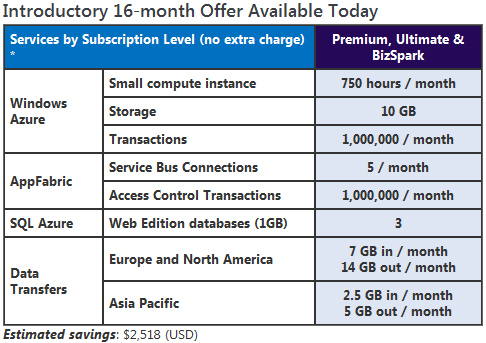
The first phase of this introductory offer will last for 8 months from the time you sign up, then you will renew once for another 8 months. After that, you’ll cancel this introductory account and sign up for the ongoing MSDN benefit (see below) based on your subscription level. Here’s how to manage your account settings after you’ve signed up:
- Sign in to the Microsoft Online Services Customer Portal.
- Click on the Subscriptions tab and find the subscription called “Windows Azure Platform MSDN Premium”.
- Under the Actions section, make sure one of the options is “Opt out of auto renew”. This ensures your benefits will extend automatically. If you see “Opt in to auto renew” instead, select it and click Go to ensure your benefits continue for another 8 months.
- After your first 8 months of benefits have elapsed (you can check your start date by hovering over the “More…” link under “Windows Azure Platform MSDN Premium” on this same page), you will need to come back to this page and choose “Opt out of auto renew” so that your account will close at the end of the 16-month introductory benefit period. If you keep this account active after 16 months, all usage will be charged at the normal “consumption” rates.
You’ll need your credit card to sign up. If you use more than the amount of services included with your MSDN subscription, we’ll bill your card for these overages. You can visit the Microsoft Online Services Customer Portal to look up your usage at any time.
- LINK: Windows Azure Platform Benefits for MSDN Subscribers
NEW: the 8-month introductory MSDN benefits have been extended to 16 months!
http://msdn.microsoft.com/en-us/subscriptions/ee461076.aspx
 kurtsh
 Kurt Shintaku's Blog