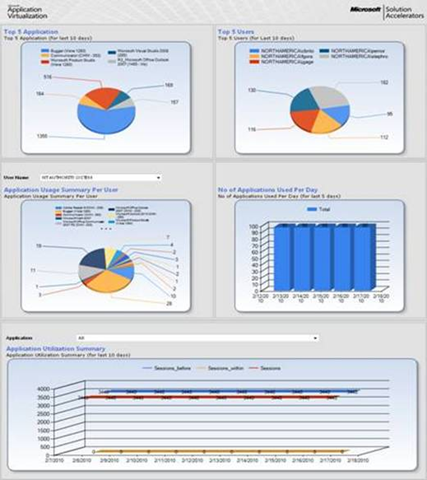
 The Microsoft® Application Virtualization Dashboard helps you monitor virtualized software applications across your organization. The dashboard’s built-in charts, gauges, and tables let you track any APP-V dataset in near-real time, so you can easily stay on top of the usage, health, and compliance of all your virtualized applications.
The App-V Dashboard is designed and built on Windows SharePoint Services 3.0 as the application platform by using Microsoft Application Virtualization 4.5/4.6.
Key Benefits
Benefits of the dashboard include:
- Actionable information out of the box. The dashboard comes with a wide range of valuable, built-in reports like top 5 applications used, top 5 users, applications never used, application usage for a specific user, system utilization, and many more.
- Near-real-time access to key information. The graphical dashboard lets customers view any App-V dataset in near-real time.
- Easy to build and configure. The dashboard’s wizard-based tools let customers easily create new dashboards in minutes.
- Easy to customize. The dashboard can easily be customized to meet the needs of different departments and other groups. Any data set in the Microsoft Application Virtualization database can be presented on the dashboard, in chart, gauge, and table formats.
- Flexible & interactive. Users can easily filter data and create ad hoc, custom views. Filters allow users to quickly drill down from high-level to more specific data.
How the Dashboard Works
The Application Virtualization Dashboard is designed to work with an existing Application Virtualization 4.5 or 4.6 infrastructure. The Dashboard queries the Application Virtualization database and uses the resulting data set to present key infrastructure metrics in a graphical format.
The Application Virtualization Dashboard uses SharePoint Web parts to manage and display data sets:
- Microsoft Dashboard Configuration Web Part. Use this Web part to create and modify the SQL queries that produce the data sets and the other properties that govern how the Dashboard displays the data sets.
- Microsoft Dashboard Viewer Web Part. Use this Web part to display the data sets. A Dashboard Viewer Web Part displays one data set at a time. The Application Virtualization Dashboard can contain multiple copies of the Dashboard Viewer Web Part at once, each copy displaying a different data set.
For more information, visit: http://technet.microsoft.com/en-us/library/ff424455.aspx
- BETA REGISTRATION: Microsoft Application Virtualization Dashboard
https://connect.microsoft.com/InvitationUse.aspx?ProgramID=4531&InvitationID=%20appv-R2V3-XDJT&SiteID=14
 kurtsh
 Kurt Shintaku's Blog