 I’m not even going to pretend that I didn’t miss this. (Or at least I think I missed this) It was announced last year around October 2009. Basically, Visio Services is a server-side rendering engine for Visio diagrams hosted on our SharePoint Server 2010 platform.
INTRODUCING VISIO SERVICES
Last week at the SharePoint Conference, the Visio team unveiled Visio Services – a new feature of SharePoint 2010 that extends the reach of diagrams considerably. In a nutshell, Visio Services for SharePoint 2010 lets you:
- View diagrams in the browser without needing Visio on your machine
- Refresh data-driven diagrams in the browser
- Integrate diagrams into SharePoint applications
Viewing diagrams in the browser
A Visio diagram, saved to a SharePoint document library as a Visio Web Drawing (a *.VDW file) using Visio Professional 2010 or Visio Premium 2010, can be viewed in any web browser by simply clicking on its file entry in the document library.
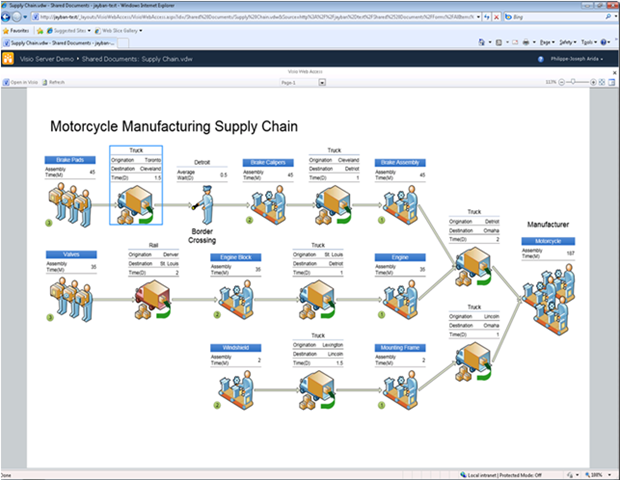
The diagram renders in full fidelity in the browser if the person viewing the diagram has Silverlight installed on their machine or as a PNG if not; Visio Services renders seamlessly anything you can draw in Visio. Take a look at the picture to the right to get a feel for the experience:
Visio Services enables you to navigate diagrams using easy to use and familiar metaphors for panning, zooming, switching pages, following hyperlinks and discovering shape data. You can also open any Visio Web Drawing in Visio using the “Open in Visio” button. Note that the person viewing the diagram can do so:
- …in any browser (Internet Explorer, Firefox, Safari etc…)
- …on any platform
- …without leaving the browser
- …without installing Visio, the Viewer or the Drawing Control
- …without needing to accept multiple dialogs or browser warnings
Also note that because the diagrams are stored in SharePoint document libraries, diagram creators get a variety of useful document management features from SharePoint such as diagram access control using permissions, diagram change tracking using versioning and the ability to attach diagrams to SharePoint workflows.
Refreshing data-driven diagrams
Visio Services has ported Visio’s data connectivity features to the browser! In case you’re not familiar with those features please take a look at “Show it like it is: connect data to your Visio diagram” for a quick summary. Note this demonstration is in done in Visio 2007, but these features are also available in Visio 2010.
In a nutshell, before Visio Services renders a data-driven diagram it fetches the diagram’s linked data from an external data source and updates diagram visuals accordingly. Note that once posted to SharePoint, your diagram is a living document that will always represent the current state of your data visually. You never need to update manually again!
Visio Services supports refreshing diagrams connected to one or more of the following data sources:
- SQL (using either Kerberos, Single Sign On & Unattended Authentication)
- SharePoint Lists
- Excel Workbooks hosted in SharePoint
- Any OLEDB/ODBC data sources that have recent drivers
If the data source you plan to connect your diagrams to isn’t in the list above, don’t worry: Visio Services supports “Custom Data Providers” which enable you, with a few lines of code, to wrap your existing data source into one that Visio Services can consume. We’ll talk about writing your own “Custom Data Provider” in subsequent blog posts.
Finally, note that Visio Services supports refresh on open, user-triggered refresh as well as automatic periodic refresh.
[gratuitiously stolen from the Visio blog]
There’s also a series of recent posts that talk about how to install and manage Visio Services.
(The last one is the most important which has links to the Ops & Planning Guides for Visio Services)
- LINK: How to install and configure Visio Services
http://blogs.msdn.com/visio/archive/2009/11/12/installing-and-configuring-visio-services.aspx - LINK: How to publish diagrams to Visio Services
http://blogs.msdn.com/visio/archive/2009/11/03/publishing-diagrams-to-visio-services.aspx - LINK: Visio Services: Details for Administrators
http://blogs.msdn.com/visio/archive/2010/03/10/visio-services-details-for-administrators.aspx
 kurtsh
 Kurt Shintaku's Blog