 For folks paying the premium for Solid State storage, speed & performance are obviously of interest to you. (Otherwise you wouldn’t be paying that 150%-200% margin for less capacity than what could be obtained using magnetics alone.)
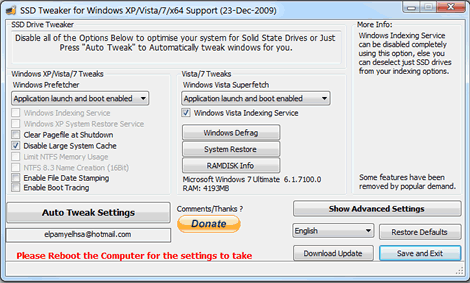
So this little find might be of interest to you. Someone named “elpamyelhsa” from Elpamsoft wrote a tool specifically for SSD users saying, “With all the advice online for SSD hard drives it can take hours of research and fiddling to properly setup your SSD drive. Now with this Utility you can adjust Windows settings in seconds including:”
– Windows Indexing Service
– System Restore
– Windows Defrag
– Use Large System Cache
– NTFS Memory Usage
– Disable 8.3 Filenames
– Disable Date Stamping
– Disable Boot Tracing
– Windows Prefetcher
– Windows Vista Superfetch
– Windows Services
Personally, I haven’t experienced much of a dramatic change however I don’t directly know how to use the tool to it’s maximum efficiency so click the link below for the download as well as advice on usage.
- DOWNLOAD: SSD Tweak Utility
http://www.ocztechnologyforum.com/forum/showthread.php?49779-SSD-Tweak-Utility
(found off of TechSpot)
 kurtsh
 Kurt Shintaku's Blog