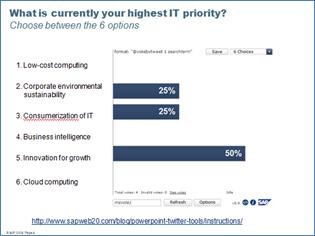
 Found this and thought I’d share it with a few of you guys that do presentations a lot. These tools essentially embed within Powerpoint and can provide an interesting level of interactivity between attendees & the presenter by leveraging Twitter & the attendee’s phones.
Kind of like a LiveMeeting, you can dynamically show on a Powerpoint slide:
- What the worldwide Twitterati are saying about the topic you’re discussing, refreshed in real time
- Live survey results simply by having an audience tweet to a specific keyword of your selection.
- Written audience feedback in real time with automated filtering to prevent idiots from swearing or saying profane things.
There are currently eight tools – you can easily cut and paste them into your own Powerpoint decks:
- PowerPoint Twitter feedback slides
- PowerPoint Twitter ticker bar
- PowerPoint Twitter voting — bar charts and pie chart
- PowerPoint Mood meter
- PowerPoint Crowd meter
- PowerPoint Zoom text
- PowerPoint Twitter update bar
- PowerPoint AutoTweet
![clip_image001[4]](https://kurtsh.com/wp-content/uploads/2010/02/clip_image00146.jpg "clip_image001[4]")
[Taken from http://blogs.msdn.com/dan_fay/archive/2009/12/15/free-powerpoint-twitter-tools-by-sap-web-2-0.aspx]
 kurtsh
 Kurt Shintaku's Blog