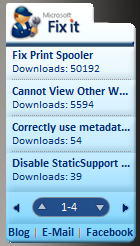
 We have a little known Windows 7/Vista Gadget known as the “Fix It” gadget that list out the most popular “Fix It” routines that we’ve published on the Microsoft Support web site. “Fix It” routines are pieces of executable code that you can run from our Support web site that automatically repair or configure your computer simply by downloading them.
And it’s a good thing too – there’s more than 260 Fix It routines that we’ve published to date, and a lot of them a really cool… but most don’t even know that a tenth of them exist.
Here’s a quick listing of some of the more useful “Fix It” routines available:
- Show Internet Explorer desktop icon (if it’s missing or deleted)
- Error when you download updates using Windows Update or Microsoft Update: 8000FFFF
- The menu bar and the toolbar are missing in Internet Explorer on Windows Vista
- How do I reset Windows Update components?
(This Fix It, in particular, is really nasty and requires a lot of work. If not for Fix It, the execution of this modifications would take a fair amount of effort.)
DOWNLOAD: Fix It Gadget for Windows 7/Vista
http://support.microsoft.com/?scid=https%3a%2f%2ffixit.support.microsoft.com%2freporting%2fgadget%2ffixit4me.gadget

 kurtsh
 Kurt Shintaku's Blog