Okay – this is cool. “Mobile Tagging” rules.
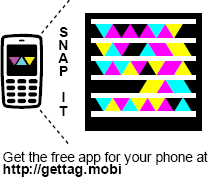
Microsoft has released both a new highly reliable & resilient computer-readable graphical code called “Tags” that are designed for rapid recognition and interpretation to enable people to post graphical objects on web sites, business cards, corporate literature, etc. and enable the average cell phone to:
- READ/INTERPRET A TAG
It will enable the camera on the cell phone to capture the graphic through a viewfinder that is shown on the phone’s screen and interpret it into an Internet URL.
- VISIT/SAVE/EMAIL THE URL
Once interpreted, the URL is then fed into the phone’s Internet browser for immediate resolution. The URL can also be automatically emailed or stored for future reference.
The camera pattern recognition technology is actually pluggable meaning that if other vendors wish they can provide modules that the camera can interpret. For example, if Symbol, the owners of 2-D barcode technology want to provide modules to make it easy to read 2-D bar codes using consumer cameras, it should be possible using the “Tag Reader” software, available.
PHONE SOFTWARE The “Tag Reader” software itself is 300k-600k and is available for various platforms including:
- Windows Mobile
- Apple iPhone
- Blackberry
- Symbian S60
- J2ME-based phone
All downloads are available simply by visiting the following URL on your phone:
http://gettag.mobi
You can also send the download to your phone over SMS by visiting:
http://www.microsoft.com/tag/content/download/
USES There are many conceivable uses for this mobile tagging technology. A tag can provide end users with information through the URL they are given such as:
- Restaurant directions
- Magazine ads
- Movie trailers
- Business card information
- Bus schedules
- Real estate listings
- Intro videos
Additionally, the graphical code format is usable on non-paper formats:
- video displays
- TV advertisements
- electronic billboards
- web sites (the tag above in this post is actually a tag for http://kurtsh.spaces.live.com)
Of course, this technology works beautifully on paper as well in magazines, books, newspapers, and other forms of literature.
 GETTING USAGE INFORMATION
A really interesting concept that’s come of this is that part of the model is providing analytics on the number of people that have used the mobile tag you’ve published. Every time someone uses that mobile tag, it is noted on the http://tag.microsoft.com central site, providing you with reports of how well visited your site is.
CREATING YOUR OWN TAGS
Creating your own tags is easy. Simply register your Windows Live ID by going to:
…and start creating your own tags. Tags a published using the Adobe Acrobat reader. You may resize the graphic to whatever view you see fit and then take a snapshot from there.
FREE!
Oh – did we mention it’s free? The software, the infrastructure, everything?
Visit the following URL for more information:

 kurtsh
 Kurt Shintaku's Blog