Did you know that if you search for a product on Live Search and find it listed with an eBay-sponsored ad, you can get a whopping 30% off almost anything you buy, particularly all BuyItNow purchases?
One of things to know is to type the words “cheap Xbox” to get the discount on an Xbox 360 purchased from eBay. Know that the discount will only apply to the first item you select, and will not apply to subsequent purchase selections during a 60 minute online session. Also be sure to enroll in the cashback program at http://search.live.com/cashback and sign in using your Windows Live ID.
Here are some instructions on how to orchestrate the discount once you’ve searched for it.
(Also, read more here from the Live Search blog.)
——————–
LiveSearch Blog: Live Search cashback now live on eBay
(as taken from http://blogs.msdn.com/livesearch/archive/2008/06/12/Live-Search-cashback-now-live-on-eBay.aspx)
Now all of eBay’s "Buy it Now" offers will be eligible for cashback rewards. With eBay’s expansive catalog of products, from jewelry to electronics, you’ll start to see more cashback ads appearing in our search results. That means more ways for you to save.
You’ll see three primary differences between this user experience and other cashback user experiences:
- There’s an eBay ad with a cashback gleam (the cashback icon in the image here).
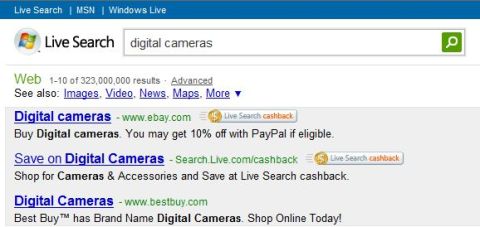
- Instead of going into the Live Search cashback experience, you now go directly to the advertiser’s website, which in this case is eBay.
- The cashback gleam follows you throughout your eBay shopping experience. This is good continuity for the consumer and something we want to do more of, but it takes a bit of work on the advertiser side to enable this.
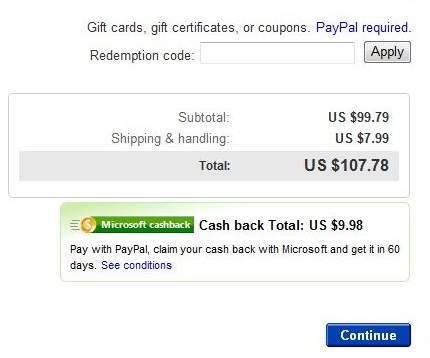
We want to learn from two experiences in the cashback program. Depending on customer and advertiser feedback, we’ll make the necessary changes to deliver the best user experience over time.
Destination site experience This is the experience that went live last month. Consumers research a product category on Live Search and then click a Live Search cashback ad to head over to cashback for the best deal. We’ve had a lot of feedback that we should do a better job integrating our product research capabilities with our cashback experience. So we’ll work hard to do that over the next few releases.
Direct-to-merchant experience The other experience we envisioned for cashback would integrate directly with advertisers from the search results page. In this experience, advertiser’s ads will appear with a cashback gleam. When shoppers click the gleam in the ad, they head directly to the advertiser’s site. Obviously, this streamlines a bit of the purchasing process but requires some custom development on the partner website to enable it. We took this approach with eBay and are exploring it with other advertisers as well.
We’re excited to offer consumers more money-saving cashback rewards with eBay and look forward to hearing from you on how best to implement new features and functionality to the cashback experience.
——————–
eBay: How does the Microsoft Cashback Rebate Program work?
(as taken from http://pages.ebay.com/help/
buy/questions/cashback.html)
eBay and Microsoft Live Search are teaming up to offer eBay buyers cash back on their purchases.
Here’s how it works:
-
Visit Microsoft Live Search: http://www.live.com
-
In the Live Search box, enter your search for a product.
-
Click on any eligible eBay-sponsored ad. This brings you to the eBay site.
Important: Your cashback offer will be good for 60 minutes from the time you click the ad and arrive on eBay.com. You must complete a purchase on eBay of any eligible items within 60 minutes of clicking the ad. For definition of eligible items and conditions, see Terms of Use. -
Look for your cashback rebate percentage at the top of the eBay page.
-
After you purchase an eligible item and pay for it with PayPal, go to My Messages in My eBay for an email with instructions on how to claim your cashback.
Important: You must click the Get cashback button in the email. -
You now need to use the link in your My Messages to link a PayPal Account with your Microsoft Rebate Center Account.
Once you have linked these accounts, it may take a few days for the eBay purchase to be seen in your Microsoft Rebate Center account. -
Microsoft will deposit your cashback redemption into your PayPal account 60 days after the eBay transaction has successfully completed including payment. Once payment is requested, it may take up to 14 days to show up in your PayPal account.
———————–
eBay: Terms & Conditions:
http://pages.ebay.com/cashbackoffer/terms.html?_trksid=m37
 kurtsh
 Kurt Shintaku's Blog